

Step-by-Step: Using Google Gemini to Build a Custom Business Assistant
Imagine having a dedicated team member who has memorized every product manual, HR policy, past client proposal, and standard operating procedure in your company and can answer questions about them in seconds.
That is the exact promise of building a Custom Business Assistant using Google Gemini on Google Cloud.
Rather than relying on generic public AI tools that know nothing about your business, creating a custom assistant allows your team to interact directly with your private operational data. Here is a plain-English, step-by-step guide on how it works and how your company can set one up safely.
Why General AI Isn't Enough for Business
Public chatbots like the free version of ChatGPT or Gemini are trained on the open internet. While they are great at writing general emails or brainstorming ideas, they fall short when it comes to specific business operations:
- They Don't Know Your Business: They cannot look up your specific Q3 pricing tiers, custom customer service policies, or proprietary product specs.
- They Risk Data Leaks: Inputting private company numbers into public consumer tools can expose sensitive records to external AI training models.
- They Can Guess (Hallucinate): If a public model doesn't know your company's exact policy, it might make up an answer that sounds convincing but is completely wrong.
By building a governed business assistant through Google Cloud's Vertex AI Platform, you ensure the AI only answers using your verified company documents, keeps your data 100% private, and provides clear source links for every response.
Step-by-Step: Setting Up Your Custom Assistant
Setting up a customized Gemini assistant for your enterprise doesn't require building software from scratch. Google Cloud provides no-code and low-code tools through Vertex AI Search and Conversation to streamline the setup process.
Step 1: Collect and Clean Your Knowledge Base
An AI assistant is only as good as the documents you provide. Gather your company’s core reference materials, such as:
- Standard Operating Procedures (SOPs)
- HR policies and benefits handbooks
- Product user manuals and technical specs
- Past sales decks and proposals
Tip: Ensure your documents are up to date. If you upload an outdated 2022 pricing guide, your assistant will quote 2022 prices!
Step 2: Upload Files to a Secure Google Cloud Bucket
Next, upload your documents into a private, encrypted storage location within your company’s Google Cloud account.
Because this storage lives inside your private tenant, your files are never exposed to the public internet or used to train Google’s public AI models.
Official Resource: Learn how enterprise privacy works on the Google Cloud Security & Privacy Center.
Step 3: Connect Gemini via Vertex AI Search
Using Google’s Vertex AI Agent Builder, connect the Gemini model to your uploaded document folder.
In this step, you can set simple rules and instructions, such as:
- "You are an internal HR assistant for GigaSphere."
- "Only answer questions using the documents provided in the HR folder."
- "If you cannot find the answer in the provided documents, state: 'I don't have that information in my records.'"
This prevents the AI from making up false answers or guessing outside its assigned scope.
Step 4: Deploy the Assistant to Your Team
Once configured, you can embed your custom assistant into the daily tools your team already uses, such as Google Workspace (Chat/Docs), a web portal, or an internal intranet page.
Employees can then ask natural language questions like:
- "What is our policy on remote work expense reimbursements?"
- "Summarize the installation steps on page 12 of the product manual."
The assistant immediately generates a clean response, accompanied by clickable links pointing directly to the exact PDF pages used to answer the question.
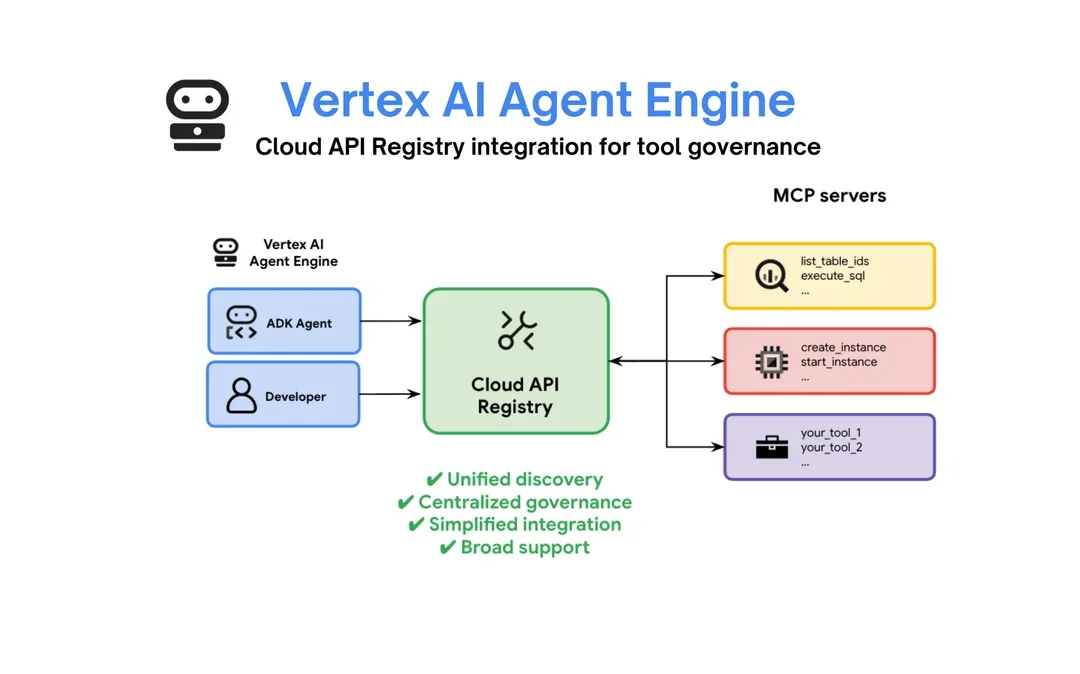
Vertex AI Agent Engine provides centralized governance and secure integration, ensuring your custom assistant connects safely to internal business tools without risking data security.
Real-World Use Cases for Custom Assistants
Department | What the Custom Assistant Does | Time Saved |
Sales & Account Teams | Instantly pulls technical specs and pricing guidelines during client calls. | Saves 3–5 hours/week searching for files. |
Human Resources | Automatically answers routine employee questions regarding benefits and leave. | Cuts repetitive HR email tickets by ~60%. |
Customer Support | Helps support reps look up obscure troubleshooting steps in real time. | Reduces average customer resolution time. |
Official Resource: Explore how companies build custom tools with the Google Cloud Vertex AI Agent Builder.
Getting Started
Building a custom AI assistant with Google Gemini is one of the fastest, highest-impact ways to bring artificial intelligence into your business. You don't need a massive IT overhaul, just clean reference files and the right cloud setup.
Ready to build a custom AI assistant for your company?
Contact GigaSphere today to discuss your goals and see a live demonstration of custom AI assistants in action.